 admin
admin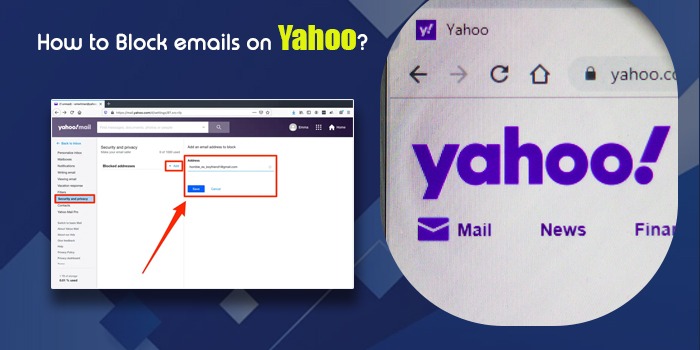
Blocking someone on Yahoo is easier and quicker. Thanks to Yahoo for allowing me to add up to 500 emails to the blocked list. That means you can block emails as many as 500. Spams are rising, and thus, securing your emails or restricting such senders is the need of the hour. In this comprehensive guide, we tackle how to block emails on Yahoo.
Types of Blocking in Yahoo Mail
You may think that directly blocking the email of a person is the only method to block the person. However, this isn’t the case. We can categories Yahoo email blocking into two ways:
- Direct Email blocking – This is the direct blocking of an email and its address. Blocking emails will stop you from receiving messages from that contact. This requires following a step-by-step guide.
- Manual Email Blocking – This step involves simple steps: just find out the email in question, and follow the steps to block the sender from there only.
Alternatively,
- Unsubscribe from an email – This is for promotional emails like newsletters from businesses. If you subscribed mistakenly and you observe that you no longer have any use for these emails, you can unsubscribe from them.
How to Block Emails on Yahoo on Web
You can block an email ID on Yahoo on the web either manually or by using the ‘Block Sender’ option. These two methods are explained below.
1. Manually block emails on Yahoo
In this method, you add email addresses from those whom you don’t wish to receive messages to the blocked address list.
- Launch your Yahoo Mail on your system.
- Hit the ‘Cog’ icon or the settings at the top right.
- Now, choose ‘More Settings.’

- Head to ‘Security and Privacy’ on the left pane.
- Here, below ‘Blocked addresses,’ hit ‘Add.’

- Type the email ID you desire to block in the address field.
- Now, tap ‘Save.’

- This will make all the blocked contacts go under blocked addresses.
- Even if individuals with these email IDs try to send you messages, Yahoo’s system automatically avoids them appearing in your inbox.
2. Block emails in Yahoo using the ‘Block Sender’ option
- On your computer, navigate to Yahoo Mail.
- Open the problematic email in the inbox.
- Now, hit the three dots icon.
- Choose ‘Block Sender.’
- In its pop-up, click ‘OK.’
POINT TO NOTE: The options ‘Block all future emails’ and ‘Delete all existing emails’ are checked by default in Yahoo Mail. You can uncheck them anytime.
How to Block Emails on Yahoo on Android and iPhone
You cannot block an email address on the Yahoo Mail app for Android. So, if you use Yahoo Mail on your phone, navigate to your web browser to block the email. What you can do on your Android mobile is to mark the email spam.
Android
- Open the Android device and access the Yahoo Mail app.
- Choose the email you wish to block.
- Now hit the three-dot icon of ‘More’ at the screen’s top-right part.
- After that, hit the ‘Mark as spam’ option.

- All the messages from this email will now get blocked automatically. They will be displayed in the spam area.
iPhone
- Open the Yahoo Mail application’s icon on your iPhone.
- Choose a message from the sender you want to block and open it.
- Hit ‘More’ and choose the ‘Block’ option to block the sender.
- Place a tick on the ‘Send all future emails to spam’ and the ‘Delete all existing emails’ boxes.
- Now, tap ‘OK’ to apply these changes.
That’s it. Now you are equipped with the understanding of how to block emails on Yahoo on iPhone and on Android devices.
How to Block Emails on Yahoo Mac
You can also block emails on Yahoo Mail on Mac. These steps will help you out.
- Find the email ID you desire to block in your Yahoo Mail for Mac.
- Hit the cursor on their name in the message header.
- Tap the arrow followed by ‘Block contact.’
POINT TO NOTE – Alternatively, you can also directly add those senders whom you wish to block to the Prohibited Senders list. To do so, choose ‘Junk Mail’ and tap the ‘Block’ button. It is present in ‘Settings’ below ‘Mail.’
Steps to Stop Spam Emails on Yahoo on the Web
Do you get newsletters or emails from unknown addresses? If you don’t find them relevant or appropriate, you can block them. These emails are known as spam, and you can block them as follows:
- Launch Yahoo Mail on your system.
- Launch the email that is spam.
- Hit the ‘Spam’ icon. If you want to send this message directly to the Yahoo spam folder.
- Multiple emails can also be chosen and transferred to the spam folder.
Summing up
Getting unwanted emails crowds the inbox and also minimises its security. So, if you are getting too many unwanted emails or your inbox is filled with spam, use the instructions in this article to block emails and mark them as spam. This will help you manage your Yahoo Mail inbox efficiently.
Frequently Asked Questions
Qs 1: Why do my blocked emails still come through Yahoo?
You may be getting emails from blocked senders in Yahoo if the email address of the blocked sender is incorrect. They might have changed their email so they can send you messages. Look out for forged addresses by looking at the sender’s information on the email. After that, block them.
Qs 2: Will the person whom I block on Yahoo know about it?
No, the sender whom you have blocked on Yahoo won’t be notified of your action. If they send you a message and it does not come into your inbox, the sender will not even get a failure notice of the message delivery.
Qs 3: Why can’t I block emails on my Yahoo mobile app?
You cannot block senders or emails on your Yahoo Mail mobile application. You can only mark them as spam and filter them out. Use a mobile browser to block emails on Yahoo.
Qs 4: How do I block unwanted emails on Yahoo?
Use the built-in feature of Yahoo to block unwanted emails. For instance, open Yahoo mail>select more icon or three dots>select ‘Block Sender.’
Qs 5: When you block someone on Yahoo Mail, what do they see?
The blocked contact will not be notified about your action. When they try sending you an email, they still won’t get a failure, but the email is blocked completely.
Qs 6: Where do blocked emails go in Yahoo?
The messages from Blocked emails go to the spam folder. The sender will not find this action. If you block someone, you can manage the blocked emails by visiting settings>More settings>security and privacy>blocked addresses.