 admin
admin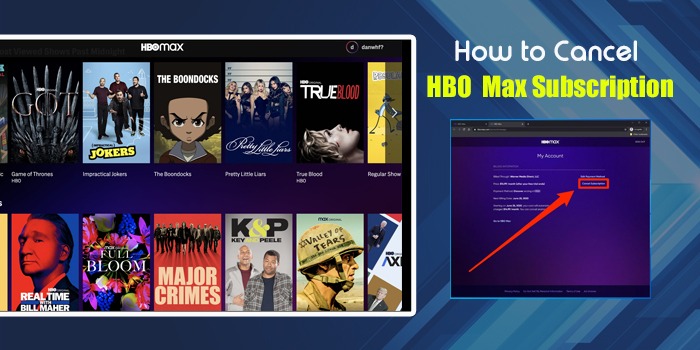
HBO Max is a storehouse of mainstream cinema and the most popular movie releases. Currently known as Max, this subscription-based streaming service is now a part of the merger of WarnerMedia and Discovery Inc. and combines HBO Originals, Warner Bros. films, Discovery+ content, Cartoon Network, and DC. Buying a subscription is possible directly through its official platform or through third parties. However, if you ever want to cancel HBO Max subscription, choose the same method you used for buying. Discover the cancellation of the Max subscription process in detail.
Quick Points:
- To cancel HBO Max subscription plan, look for the source used to buy the plan. The same source will help you cancel it.
- You can buy or cancel HBO Max Plan either directly from the official website or you can do it with the help of third party platforms like Amazon, Google Play Store, Apple Store, etc.
- Although you can successfully cancel your plan, but there is no refund given to you for the remaining days.
Why Do You Want To Cancel HBO Subscription?
If you wonder why someone would want to cancel an HBO Max subscription, we describe the reasons below. Have a look:
- Cost Concerns
Many people have complaints about the cost of the streaming service, and they say that other streaming services are cheaper and more useful compared to this one. So, the cost is the major concern why people choose to cancel their subscription.
- Limited Usage
A chunk of users give reasons to cancel, like they don’t spend much time on HBO Max. Only when popular shows like The Last of Us, House of the Dragon, etc., come out do they subscribe and watch. The rest of the time, it’s a waste of money. That’s another reason people want to cancel it.
- Too Many Streaming Services
As there are many more options to stream different genres of entertainment, people want to try new things and therefore switch to other platforms like Netflix, Disney+, Amazon Prime Video, etc. They get more value there rather than HBO Max, high in price and low in content satisfaction, as they believe.
How to Cancel HBO Max Subscription
Here is the step-by-step guide to cancelling an HBO Max subscription.
Step 1: Find out Who Bills You for the HBO Max Service
The first step to cancelling the HBO Max subscription is to find out who is billing you for this service. You may have either signed up for a third-party billing provider or through Direct HBO Max itself.
Step 2: Cancel Directly through HBO Max on App
If you have used the HBO Max mobile app for this purpose, check the steps to cancel HBO Max subscription:
- Head to HBOMax.com.
- Now, on your mobile device, click on your profile. Choose ‘Settings’ and go to ‘Subscription.’
- On a PC, tap on your profile. Now, select ‘Settings’ and locate ‘Subscription.’
- If you are using a smart TV, hit the ‘Settings’ icon followed by your ‘Account.’
- These steps will let you find out through whom your subscription is billed.
Step 3: Cancel HBO Max Subscription from Official Website
It’s quite simple to cancel your HBO Max subscription by visiting the official website of HBO Max. Access HBOMax.com and follow these points.
- On the upper-right part, locate your profile name and tap it.
- A drop-down menu will launch.
- Choose the ‘Settings’ option.

- Go to the ‘Subscription’ section.
- Pick the ‘Manage subscription’ label.

- In the new screen, choose the ‘Cancel subscription’ option.

- Now, tap the ‘Continue to cancel’ button.

- Finally, choose ‘Yes, cancel the subscription.’

- You can keep using HBO Max till your subscription ends when a cycle completes.
Step 4: Canceling HBO Max Through Your TV or Cable Provider
You can also purchase HBO Max through the services of cable TV providers. These include Comcast or Xfinity, YouTube TV, Hulu, and Spectrum. If you’ve bought HBO Max through TV, internet, and wireless providers, cancel it by using their main site. You will need to sign into your specific account and then manage the subscription.
In the following sections, you will learn how to cancel an HBO Max subscription if it’s purchased through iOS App Store and Google Play Store.
Step 5: End Your HBO Max Subscription from Third-Party Sources:
-
App Store:
Use this simple process to cancel your subscription if it comes from the iOS App Store.
- Launch the Settings application on any Apple device. It can be an iPad, iPhone, or iPod touch.
- Touch your name. It is at the top and will have a subtitle.
- Now, touch ‘Subscriptions.’
- Again, touch ‘HBO Max’ to manage subscriptions.
- After that, touch ‘Cancel Subscription.’
POINT TO NOTE: If the ‘Cancel Subscription’ option is not there, go to ‘Inactive’ and check if it’s there. If the option to cancel the subscription is still invisible, you didn’t purchase it on your device.
2. Google Play Store:
Like above, you can easily cancel your HBO Max subscription if you bought it from the Google Play Store. Here are the steps that will aid you in this process.
- Open Google Play Store.
- Press your profile picture.
- The profile menu will open.
- Touch ‘Payments and subscriptions.’
- Now, touch ‘Subscriptions’ and after that ‘HBO Max.’
- Next, tap ‘Cancel Subscription.’
3. Cancel HBO Max Subscription on Hulu
You also have the option to bundle HBO Max and Hulu. Here are the steps to halt your subscription via Hulu.
- Go to hulu.com/account.
- Sign into your account.
- Below the ‘Your Subscription’ section, choose ‘Manage plan.’
- Now find ‘HBO Max.’
- Slide the check to an X.
- Now, tap ‘Review changes.’
Is It Possible to Cancel HBO Max’s Free Trial?
You can cancel the HBO Max Free Trial before it expires. To do so, follow these points:
- Sign in to your HBO Max account.
- After that, tap the ‘Profile’ icon at the top-right portion.
- Now head to ‘Billing information.’
- Here, choose ‘Manage Subscription.’
- Tap the ‘Cancel subscription’ option.
- Now, input a reason for canceling your subscription.
- After confirming, you will have canceled your HBO Max Free Trial.
POINT TO NOTE: HBO has discontinued the Free Trial promotion.
Summing up
Cancelling HBO Max on the website and mobile phone isn’t difficult. If you’re looking for how to cancel HBO Max subscription, just use the simple process described above. If you purchased HBO Max through a third-party provider, then also use the steps listed in this article to end it.
Frequently Asked Questions
Can I cancel my HBO Max subscription immediately?
You can cancel your subscription to HBO Max on any device by going to the ‘Subscription’ section. From here you can manage your subscription and cancel it. But your billing cycle has not ended, you can continue using HBO Max till that period.
Can I cancel my HBO Max on Amazon?
Yes, you can do that. Head over to the Amazon App Store and log in to your account to cancel your subscription. Visit ‘Digital content and devices’ followed by ‘Your apps’ and then ‘Manage.’ After that, select your subscriptions and disable the auto-renewal of this streaming service.
Why has Amazon Prime canceled my HBO subscription?
Prime Video, Amazon’s streaming service, has canceled HBO Max subscriptions that users signed up for via their Amazon accounts. So, your HBO Max will not be there because Prime Video has canceled it. However, you can still download the HBO Max app on your Amazon Fire TV device.