
In Meta’s linked account system, people often ask one crucial question: if they change a Facebook password, will their Instagram access break? This guide shows how to update Facebook security while keeping Instagram access intact.
Quick answer (TL;DR)
Short answer:
Change your Facebook password in Accounts Center but select only the Facebook profile — this updates Facebook credentials and usually does not log you out of Instagram apps already signed in. Verify sessions afterwards using the “Where You’re Logged In” tool.
Why Use the Accounts Center for Password Changes?
The Accounts Center shows linked profiles and shared settings; use it to choose which account’s password you want to change and to review cross‑account security options.
- Unified Security: You can see exactly which accounts are linked and manage them simultaneously.
- No More Confusion: You don’t have to hunt through separate app settings; the interface is identical for both platforms.
- Cross-Platform Alerts: If someone tries to bypass your security, Meta can notify you across both apps.
How to Change Facebook Password Without Affecting Instagram (Desktop)
- Visit Facebook.com and log in.
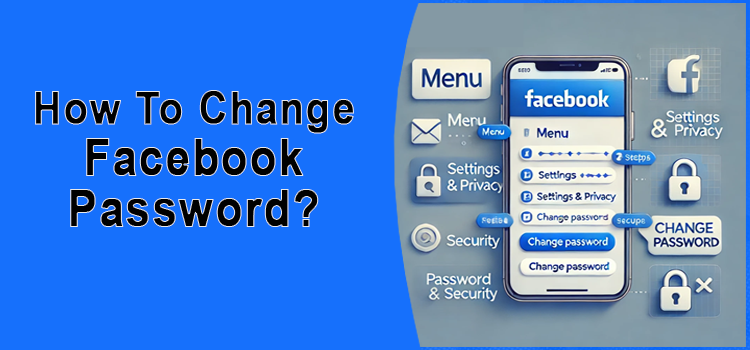
- Click on your Profile Picture (top right) and select Settings & Privacy > Settings.
- On the left sidebar, click the Accounts Center box.
- Under “Account Settings,” click Password and Security.
- Tap Change Password.
- Crucial step: When shown linked accounts, choose only the Facebook profile (do not select Instagram) so you change just that account’s credentials.
- Enter your Current Password, then create a New Password.
- Click Change Password to finish.
Changing Password on Mobile (iPhone & Android)
Managing your security on the go is simple.
- Open the Facebook App on your phone.
- Tap Menu (≡) from the top right (Android) or bottom right (iPhone).
- Tap Settings and Privacy, and then Settings.
- Tap the See more in Accounts Center link at the top.
- Choose Password and Security > Change Password.
- Tap your Facebook account — avoid selecting Instagram if you only want to change Facebook credentials.
- Enter your current password and create a new one with a mix of letters, numbers, and symbols.
- Finally, tap Change Password.
Verification checklist
- Open the Instagram app and confirm you are still signed in.
- On Facebook, visit Settings → Accounts Center → Password and Security → Where You’re Logged In, and remove unfamiliar sessions.
- Confirm your 2FA methods (SMS, authenticator app) are active for Facebook; re‑enable if necessary.
Caveat: If you use passkeys, a password manager, or a single‑sign‑on provider that syncs credentials across apps, behavior may differ — consider disabling SSO or export/passkey checks before changing passwords and re‑verify sign‑ins afterwards.
Source: official Meta support pages about Accounts Center and password changes — see Facebook Help.
What Happens to Your Instagram Account?
Important: linked accounts in Accounts Center are connected for switching and some shared settings, but they normally keep separate login credentials unless you explicitly change both.
- Linked but Separate: While they are linked in the Accounts Center for easy switching, they still maintain individual login credentials.
- No automatic logouts usually: Changing your Facebook password normally does not sign you out of Instagram sessions already active, but behavior can vary with passkeys, SSO, or Meta Account changes — verify with the checklist.
Troubleshooting example: forgot FB password but keep IG
If you can’t sign in to Facebook but your Instagram is still active, use Facebook’s Forgot password? flow (on desktop or mobile) and select email or SMS recovery — this resets Facebook credentials only and does not change Instagram unless you explicitly update that account too.
Facebook Password Best Practices
- Create a strong password: A passphrase or password of 12+ characters is recommended (use a unique phrase or password manager).
- Check Login Activity: Use the “Where You’re Logged In” tool in Accounts Center to remove any suspicious devices.
- Enable Two-Factor Authentication (2FA): This ensures that even if someone steals your new password, they still can’t get in without a code from your phone.
Frequently Asked Questions
If I change my Facebook password, will my Instagram password change too?
Usually not. Unless you select both accounts in Accounts Center, Instagram’s stored password stays unchanged — still, confirm with the verification checklist below.
Does changing my FB password log me out of the Instagram app?
No. Your Instagram session is independent. You will only be logged out of Facebook sessions on other devices.
What if I forgot my Facebook password but want to keep my Instagram?
You can use the “Forgot Password?” link on the Facebook login page. This allows you to reset your Facebook access via email or SMS without affecting your Instagram account.
Does changing your Facebook password log everyone out?
Changing a Facebook password will usually sign out other Facebook sessions; it typically does not sign out existing Instagram sessions, but test the verification checklist if you need to be certain.
Related Articles