
Instagram is more about people connecting and sharing personal life moments with them. Everybody wants to look at others’ profiles to see what’s going on in their lives. But not all are comfortable with this gesture, and therefore they search for how to hide Instagram followers. A direct button does not exist to hide followers on Instagram. Users need to take action like blocking, restricting, removing a particular profile, and privating the profile.
No worries, I will guide you every step of the way to protect your personal account from others. Just be with us till the end!
I will share how I managed to remove a few particular users from my followers list using the methods discussed herein.
| Quick Answer (TL;DR) |
Hiding or removing someone from your following list is possible through one of these options:
|
Can You Completely Hide Followers on Instagram in 2026?
Let me tell you honestly: there’s no single button you can press and hide your followers without you removing them from your Instagram account. The only way is to restrict the user in multiple ways, as outlined in the post.
Instagram works on a binary privacy system. If your account is public, anyone — whether they follow you or not — can tap your follower count and see the full list.
On the other hand, if your account is private, only people you’ve approved as followers can see it. There is no in-between option natively built into the app.
What many people don’t realize is that even on a private account, your existing approved followers can still see your followers list. Switching to private-only blocks strangers and non-followers, not people already in your circle.
How to Hide Instagram Followers
That said, here are the three most effective methods to hide or limit your followers on Instagram:
1. Make Your Account Private
When you switch to a private account, your posts, stories, and follower/following lists become visible only to people you’ve approved. New visitors cannot view your personal content. What they can see is: your profile picture, username, bio, and follower count.
Here’s how to make your Instagram profile private.
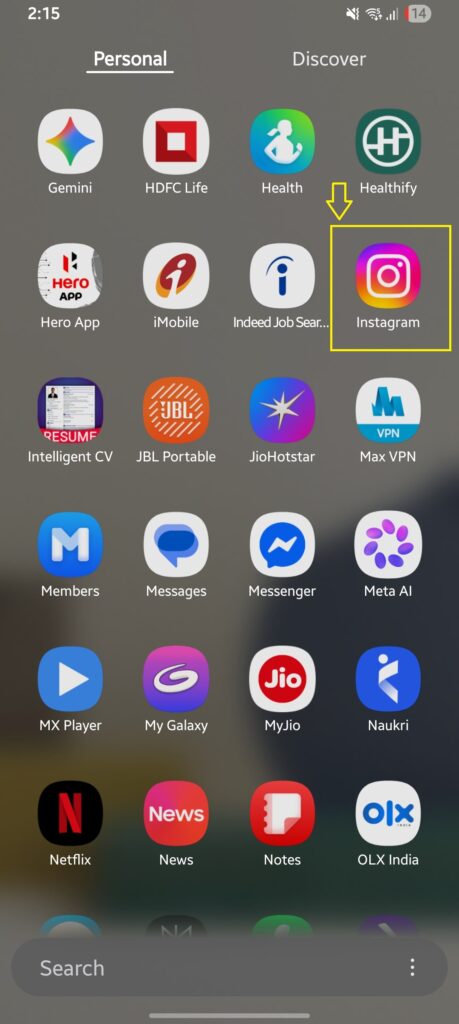
Open Instagram
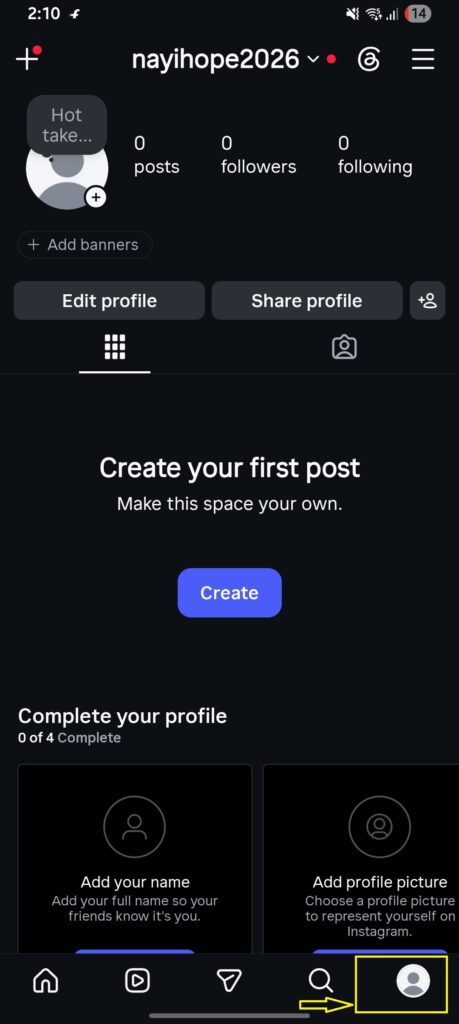
Tap your profile photo in the bottom-right corner.
Tap the three horizontal lines ≡ (in the top-right corner)
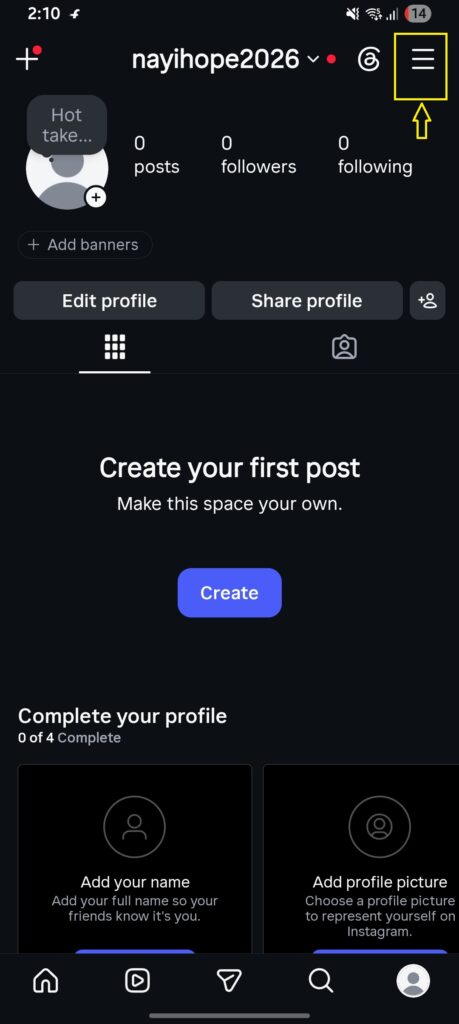
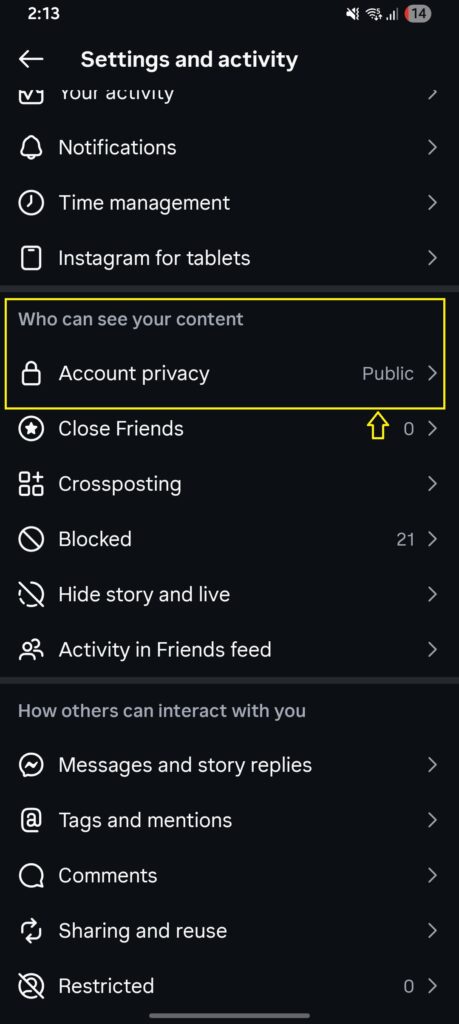
Scroll and tap Account privacy options under the banner: who can see your content.
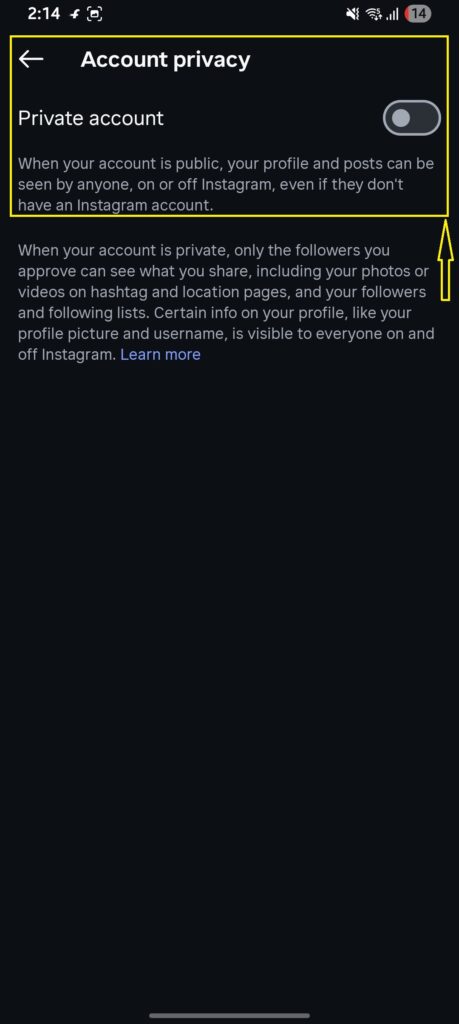
Toggle on “Private account” (Instagram will ask you to confirm)
Tap Switch to Private.
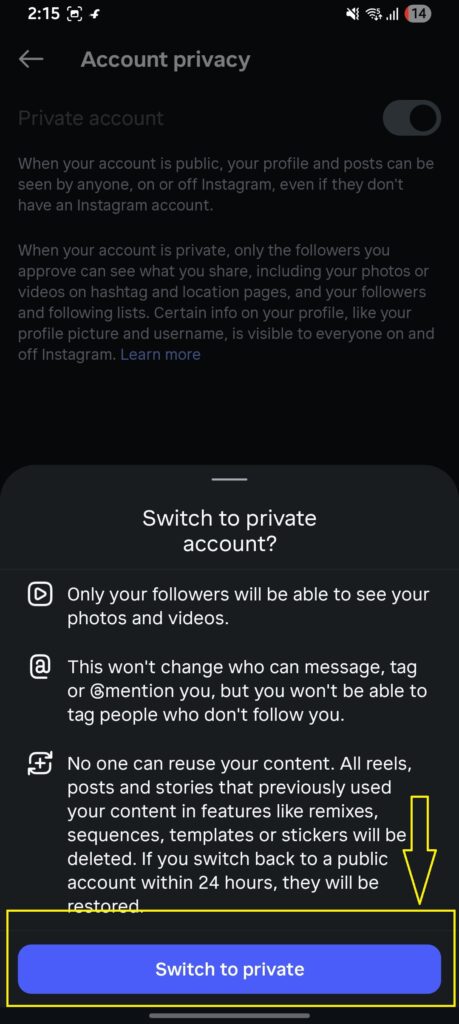
Note: Your follower count is still visible to everyone, but clicking on it reveals nothing to non-followers.
What you can do is: After going private, go through your existing followers and remove anyone you don’t want inside that gate.
Check out this: How To Change Instagram Chat Theme Back To Default
Note for business and creator accounts:
Instagram does not allow Business or Creator accounts to switch to private. These account types are always public by design, because Instagram ties privacy status to analytics and advertising features.
2. Block the Particular User
If you only need to hide your followers from one specific person, an ex, a nosy acquaintance, or someone you find uncomfortable- blocking is the most direct solution. Once you block someone, they can’t find your profile, see your followers, see your posts, or send you messages.
How to block someone on Instagram:
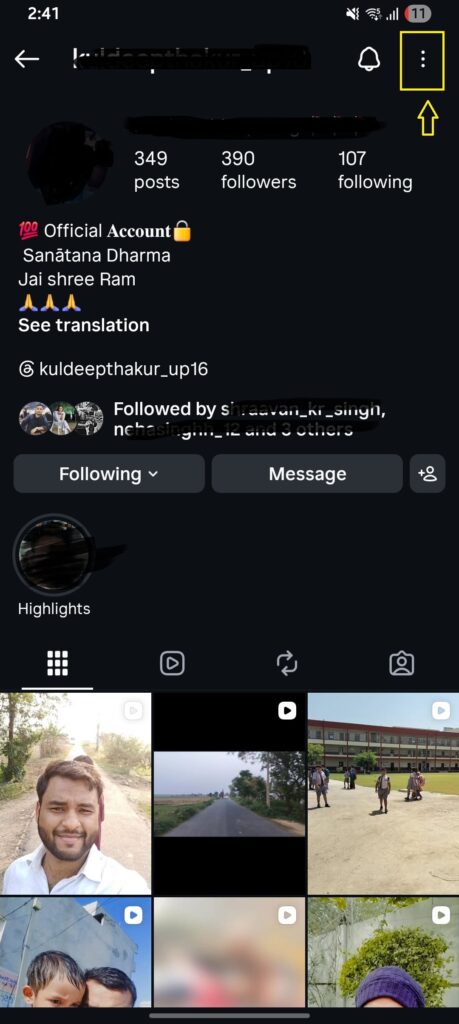
Go to that person’s Instagram profile and tap the three dots (⋯) in the top-right corner.
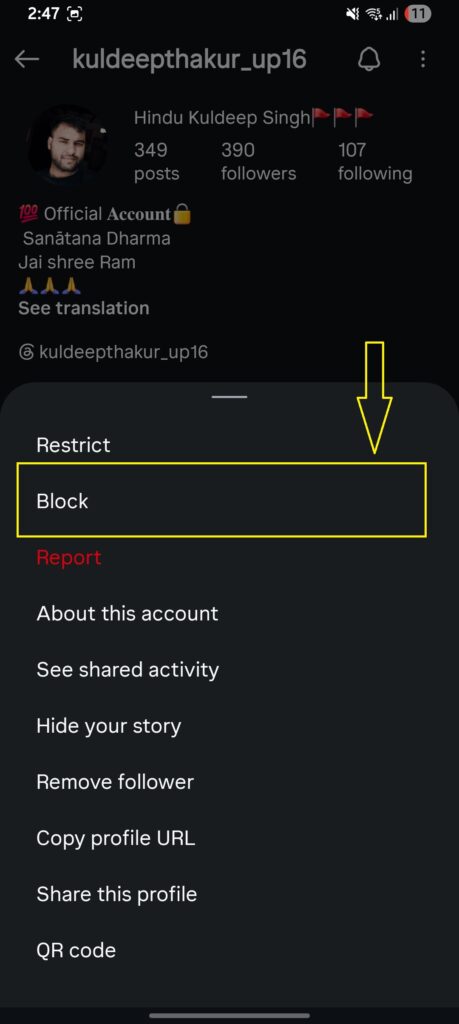
Tap “Block.”
Confirm the action by clicking the “Block” again.
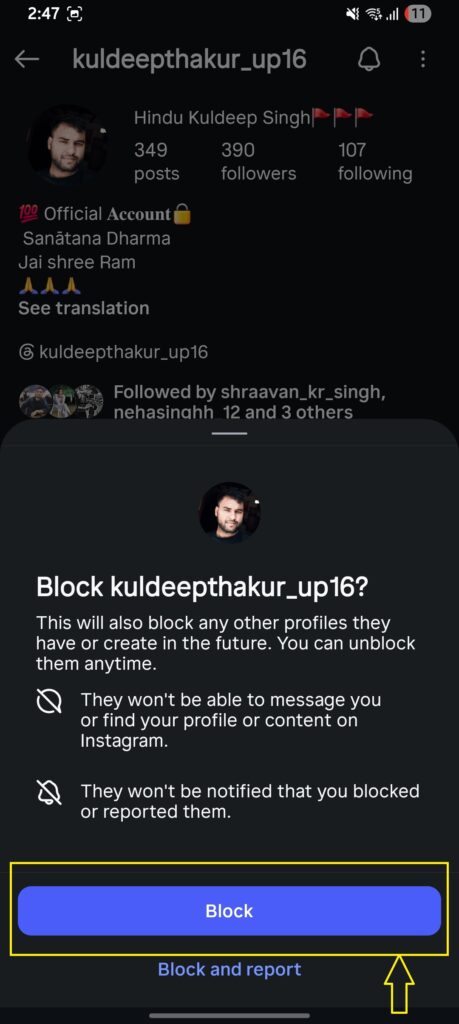
Note: The person won’t receive a notification. But they may notice if they try to search for you and can’t find your account.
Alternatively, you can restrict users from commenting on your posts if you don’t want to block them entirely.
Tip: Pair blocking by making your Instagram account private for the strongest protection.
3. Remove Unwanted Followers
If you don’t want to block someone but still want to limit their access, simply remove them as a follower silently. They won’t get any notification. They’ll just no longer be following you.
How to remove a follower on Instagram:
Go to your profile and tap on your Followers count.
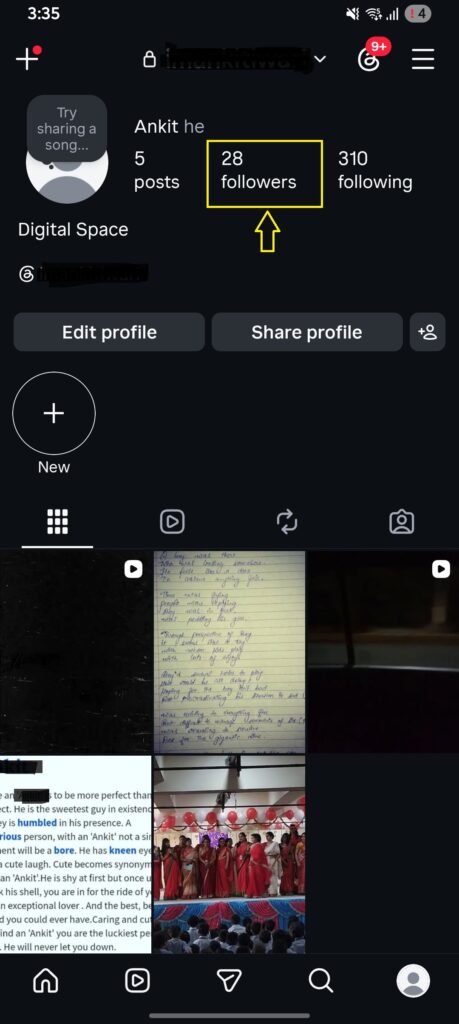
Find the person you want to remove (use the search bar).
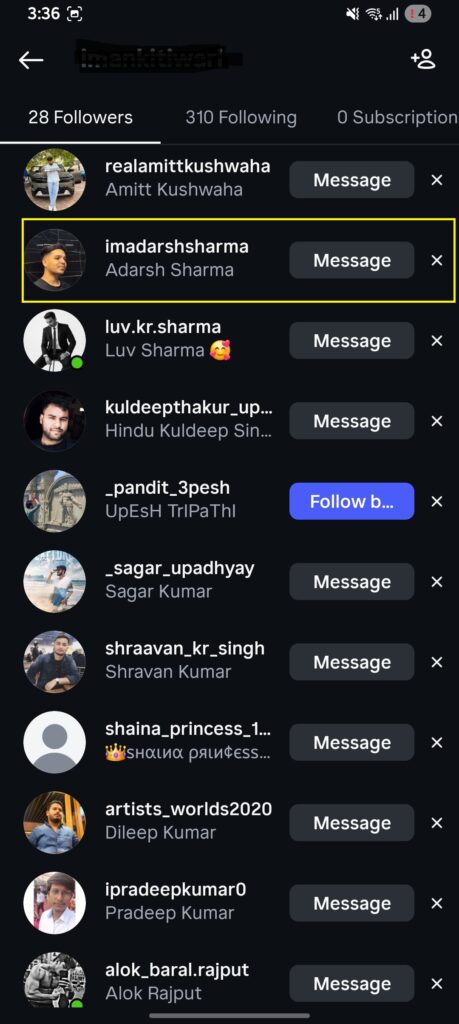
Tap the three dots (⋯) next to their name.
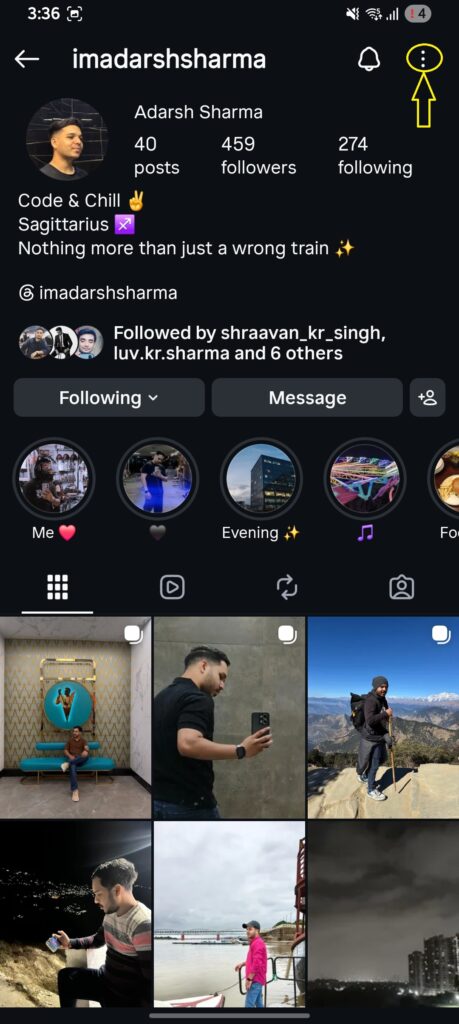
Tap “Remove follower”
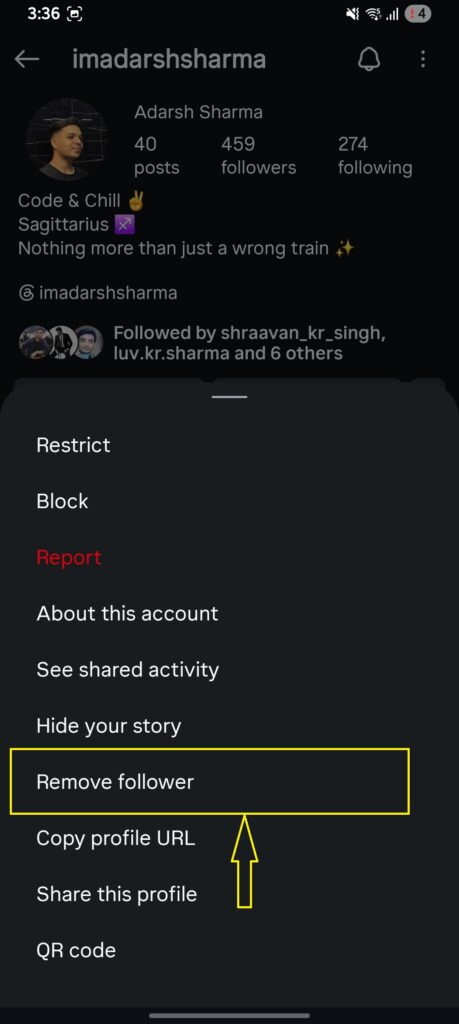
After you remove the person as your follower, private your account for further interaction with that person.
Note: Avoid bulk-removing followers too quickly. Instagram’s system can flag rapid mass actions as spam behaviour, which may temporarily restrict your account.
How to Hide Followers From Particular Users
There is no built-in setting that says “hide my followers from this one person while keeping them visible to everyone else.” But a few ways can help you do so.
Option 1: Remove + Private Account (Most Effective)
The most effective method to restrict one person from your Instagram profile is to remove them from your followers list. It’s possible by visiting the person’s profile, tapping three dot icons, and selecting ‘remove followers.’ Moreover, you can make your account private to protect their invasion.
Option 2: Block (Hard Stop)
Blocking a particular user is another way you can try to hide your followers from others. But that is a visible practice – the person being blocked can find it out easily when they visit your profile and find it blank.
To block, visit the particular profile, tap the three-dot option, and click ‘Block.’
Instagram Privacy Settings to Consider
While none of these directly hide your follower list, they do contribute to a stronger overall privacy posture on the platform:
- Hide Activity Status: Turn off the green dot that shows when you’re online. Visit your profile, tap the three-line icon, search for Activity Status and toggle off Show Activity Status.
- Close Friends for Stories: You can add people to the Close Friends section and share content with them only, without unfollowing or blocking others. To do so, tap three lines on your profile, and select ‘Close friends.’ Add trusted people.
- Story Hide: You can hide your Stories from up to 1,000 followers individually without removing them as followers. Go to your Story settings and find the “Hide story from” option.
- Suggested Accounts: Reduce how often Instagram suggests your profile to strangers. Under Settings, explore “Suggested Content” and “Similar Account Suggestions” options.
Note: None of these settings hides your followers lists specifically. They’re best used as part of a broader privacy approach alongside the methods above.
Why Can People Still See Your Followers?
Even if you private your account, remove followers, or even block them, they can still look at your profile’s content if your profile is public, the person is still following you, you just restricted them (from commenting and messaging you), and others. Check why it happens:
1. Still a Public Account
If you have not made your account private yet, chances are the followers can still visit your profile and access your content easily – even if you have removed them from your followers list. The action you have taken is only to remove the person from your list, but the visible profile is still accessible to all, including the person you removed.
2. The User is already Following You
Even if you changed your Instagram profile to private, the person is still following you and has all the access. This restriction is for new visitors only. You cannot stop existing followers from accessing your photos, videos, highlights and other content on your profile.
3. Selected “Restrict” over Blocking
People assume restricting can stop others from accessing your profile. That’s a wrong assumption. Restrict option only restricts users from commenting on your posts and messaging you – it does not disallow users from visiting your profile.
4. Account is Public Even After Removing Them
As a user, you may think removing a person from the list is all you need. But in reality, you also need to private your account along with removing a user to fully get rid of the person. The remove + block combination, or remove + private account, is needed to truly cut off access.
5. They Can Still See Mutual Connections
Even on a private account, Instagram shows hints of mutual connections in some places — like “Followed by [username] and 3 others” on certain profiles. This isn’t your follower list being leaked. It’s Instagram showing social graph data in a limited way. You can’t turn this off entirely, but it’s much more limited than your full follower list being public.
Advantages and Disadvantages of Hiding Your Followers on Instagram
Before you make any changes, it’s worth understanding both sides. Hiding your followers isn’t always the right move — it depends on what you’re trying to accomplish.
| Advantages | Disadvantages |
| Better privacy from strangers & bots | Public accounts can’t fully hide the list |
| Protects personal relationships from being mapped | Approved followers still see your list |
| Reduces unwanted follow-back pressure | Private accounts lose reach & discoverability |
| Shields you from competitor scouting (creators) | Business/Creator accounts cannot go private |
| Less social comparison anxiety | Requires manual follower management |
| Safer environment for sensitive niches | Blocked users may notice & feel snubbed |
Frequently Asked Questions (FAQs):
How to hide your following list on Instagram without private account
If you want to hide the following list on Instagram without privating your account, simply block the user and remove them entirely.
How to hide followers on Instagram business account
The business account is mostly public. So you cannot hide a particular user; blocking is the only option left.
Who can see my followers on Instagram?
All the users following you can check out your followers list. You can restrict users if you want by blocking them or removing them as followers and privating your profile.
How to hide Instagram followers and following list
There is no direct button to hide the followers and following list on Instagram. The only way is to restrict the user by either removing them from your profile and privating your account or just blocking them entirely.
How to hide Instagram story from all followers at once
To hide an Instagram story, you can choose to share it with “Close friends” only.
Why can’t I see the followers of someone I follow on Instagram?
The most obvious reason is that they have blocked you from their Instagram account. That’s why you can’t see their followers – only a blank profile is shown.
Final Remark
Hiding followers on Instagram is not something you can do with a click. The action has to be taken over a particular person or a group of them. You can restrict them from accessing your profile’s content. To do so, you can remove a follower, block a user, and private your account. This takes a minute to fix. For better guidance, check out our guide and learn from the original screenshots for better navigation.
Sources & References
- Instagram Help Center — Private Accounts: https://help.Instagram.com/448523408565555
- Instagram Help Center — Blocking People: https://help.Instagram.com/426700567389543
- Instagram Help Center — Restrict Accounts: https://help.Instagram.com/2638385956221960