
I have been an Instagram user for the last 8 years. But recently, I discovered that my favorite people dropped off my Instagram shared list. And here’s the twist: Instagram is right now showing some random users who I had my last conversation around 7 to 8 months ago. So I have tried some troubleshooting solutions, and one of them is hard refreshing your account.
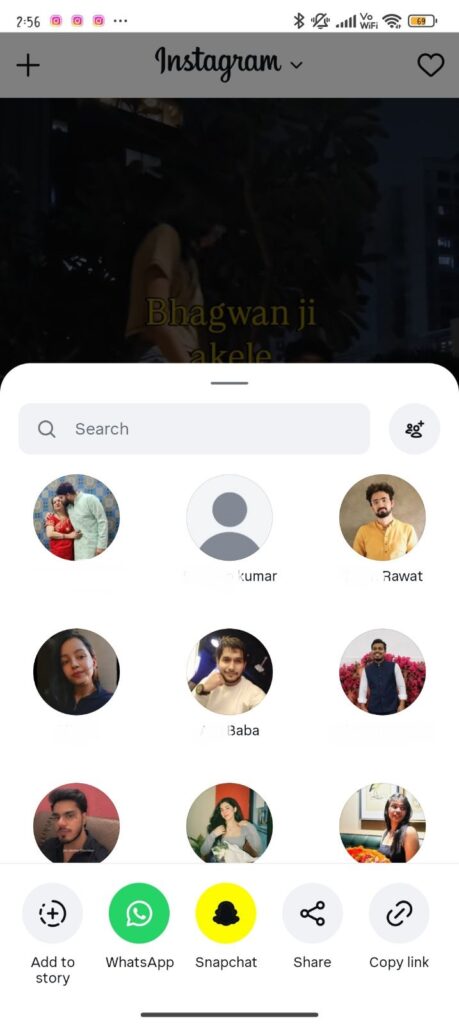
By doing so, when I open my Instagram, my favorite people come to the exact position that they were in before. Besides this, I have explored some other approaches for you. To know which strategy suits you well, just go through the entire blog.
Why Did My Close Friends Disappear From My Instagram Share List?
According to a Reddit user, his frequent and close friends are dropping off his shared list. Right now, Instagram is just showing you random user accounts that you have not been connected with in the last 4-5 months. Here are some common reasons why it is actually happening within your profile.
1. They Stopped Replying
Reddit users have analyzed that Instagram fully prioritizes and tracks how you and your friend are chatting with each other. So, take an example that you are sending multiple reels to your friend in a day. However, they don’t share even a single video. In that scenario, Instagram automatically thinks that you are spamming. And this is the main reason Instagram pushes its username to the last of your friend list.
2. An App Update
Various YouTube and Android users faced a similar problem even after using the updated version of Instagram. However, there is a high possibility that the latest update broke the app’s capability to load or display your past chats properly. After this circumstance, your close friends’ list will automatically start disappearing. And then it leads to showing you only two or three random usernames randomly.
3. The App’s Memory is Confused
While other users are complaining about the buggy app update, my point of view is that sometimes Instagram’s memories get confused in between. In short, Instagram usually keeps a record of all your favourite friends’ lists so that it can display them faster. However, when Instagram executes tests for releasing new features, your app automatically gets disconnected from the main system. And at this point, Instagram gets confused about whether it shows you close friends or a random list of users.
So, just understand that the main problem is on Instagram’s backend side, not within your phone. To fix it, you have to restart your device.
How to Fix the Instagram Reel Sharing Not Showing Certain Contacts?
As per my research, I found three solutions that definitely work for getting back certain contacts. Other than that, you can also perform some additional methods if you want to do so.
Solution 1: Hard Refresh Your Account (Log Out & Log In)
There is a chance that there might be some server-side error, which might be misaligned with your device.
- Open your Instagram profile.
- Tap on the three lines.
- It will open the Settings and Activity page.
- Scroll down to the end of the page.
- Tap on Log Out.
- Close the app properly.
- Launch it and then log in again.
Solution 2: Clear the App Cache
For Android:
- Access Settings within your device.
- Go with the Apps section.
- Proceed further with the App Management category.
- Scroll down, or you can search for the Instagram app.
- Choose Storage.
- Tap on Clear Cache.
For iOS:
If you have tried clearing the cache on Android but the result is not up to the mark, you can simply opt for an iOS device. Here are the instructions.
- Open your device’s Settings.
- Tap on General.
- Choose the iPhone Storage.
- Tap on Instagram.
- Choose Offload App.
Solution 3: Uninstalling and Reinstalling the App
Deleting the app and reinstalling is preferred by many users. Check these steps to fix this temporary glitch within your Instagram app.
For Android
- Open Settings on your device.
- Tap on Apps.
- Move towards the App Management section.
- Tap on Instagram.
- Choose the Uninstall option.
- Come to the Google Play Store.
- Reinstall the Instagram app.
- Log in with your necessary credentials.
For iPhone
- Come to the Home Screen.
- Hold down the Instagram app icon.
- Go with the Remove App option.
- All your login credentials will be saved.
- Navigate to the App Store.
- Search for Instagram and then install it.
- Lastly, mention essential information.
Solution 4: Check for Restricted Accounts
Sometimes, you have restricted the user or changed your privacy settings. So, what you need to do is go through these workarounds:
- On your Instagram profile, navigate to Settings and Activity by tapping on three horizontal lines.
- Scroll down a bit and look for how others can interact with you.
- Tap on Restricted.
- See whether the particular user is restricted or not.
If you see any user is restricted, unrestrict them.
Solution 5: Sync Your Device Contacts
If you have forgotten to configure your device contacts within your Instagram account, you can also try to do so.
- Access your Instagram profile.
- Tap on the three horizontal lines.
- Here, the Settings and Activity page will be opened.
- Choose Account Centre.
- Tap on Your Information and Permission.
- Go with the Upload Contacts option.
- Make sure to enable Connect Contacts.
Solution 6: Report the Issue
Alternatively, if other methods won’t work for you completely, I have explored one solution for you. Just report the issue within the Instagram Help Center.
- Open Instagram.
- Come to your Profile.
- Go to the hamburger menu.
- Scroll down a bit to find Help.
- Tap on Report a Problem.
- Explain your problem in detail.
- And send the Message.
User-Preferred Troubleshooting Methods Based On My YouTube, Reddit, and Quora Research
This tabular representation states which method worked the most for users based on their comments or views on platforms like YouTube, Reddit, etc.
| Method | Preference Level |
| Hard Refresh Your Account | Highly preferred, as most users have achieved success by performing this method. |
| Reinstalling | Preferred |
| Cache Clearing | Preferred |
| Check for Restricted Accounts | Preferred |
| Sync Your Device Contacts | Preferred |
| Report the Issue | Preferred |
How to Fix Instagram Showing Only 2 Random People When Sharing Reels
It seems to be very irritating when you want to share a reel, but Instagram has a different mood. It only offers you two usernames, and the best part is that they are not your close friends.
Here, let’s see what our users have already performed.
As stated by a Reddit user, they have tried various troubleshooting solutions, such as updating their Instagram app, clearing the app cache, restarting their phones, and even uninstalling and reinstalling their Instagram app.
But nothing has changed. In fact, the user has seen the problem occur at the top. Moreover, according to him, this error is very specific to account types. It means that when he switched to their work profile on the same gadget, this 2-user profile was fixed. Plus, the exact close friends list appeared when he was trying to share the reel.
So, according to this user’s perspective, this error is profile-based, not physical mobile-based.
How to fix it:
- You can try to switch your personal account to a Business or Creator one. After that, leave it for 5 minutes, then convert it into a normal one.
- Alternatively, you can choose the person who is not visible in your preferred quick-shared list. What you need to do is:
- Come to your Direct Inbox section.
- Search for the username or open their chat thread.
- Send them any message, whether it can be a text, GIF, photo, or emoji.
By doing this, your error can be fixed. And the Instagram server will be able to know that the particular user is still active.
How to Fix the “Try Again Later” Error When Syncing Contacts
While syncing contacts on Instagram, multiple users are there that face the “Try Again Later. We limit how often you can do certain things… let us know if we made a mistake” error. This is how the community users respond.
Reddit and YouTube users mostly face this error and seem to be very frustrating. In addition to that, they clearly noted that they have only tried one or two times. However, Instagram has blocked them, but the pop-up has already blocked them. In fact, they have taped on “OK” or “Tell Us.” But nothing goes well. With those, they got stuck in between and got the same previous random user’s shared list.
So, my point of view on this is that it can happen because Instagram has an anti-spam rule. Plus, Instagram detects millions of fake bots on a daily basis, and it has very strict security.
This is the best troubleshooting strategy that can help you to get rid of the “Try Again Later” error.
- Use Your Device Settings, Not The App. To do so,
- Close the Instagram app properly.
- Open your device’s Settings.
- Tap on Apps.
- Move towards the App Management.
- Choose Instagram by searching for it.
- Tap on Permissions.
- Disable Contacts.
- Wait for at least 10 seconds.
- After that, enable it.
What to Do When Usernames Do Not Appear In The Share Search Bar
Another error that I came across while figuring out the Instagram reel sharing was not showing certain contacts. Suppose you have clearly mentioned their exact username in the search bar, but nothing shows up. However, you already know that the particular person is mostly active, but Instagram decides to display that they are not.
Check out the following section to know what the community users are mostly saying about.
Users on Quora and Reddit reported that they have searched for their friends by mentioning their exact username. However, the Reel shared menu shared a blank screen or a “No Results Found” issue. And here’s the catch: you can normally view their profile if you use the standard Instagram search bar. This error can only happen if you are trying to share reels actively.
From my point of view, while using the search bar, Instagram provides you with the entire directory that is similar to the username. Meanwhile, if you use the search bar inside the reel sharing menu, the app is restricted to the search filter. And if you face challenges in the second scenario, it is all because Instagram may encounter a temporary glitch.
Recommended Fix:
- Go to your regular direct messages.
- After that, choose a friend and send them any emoji or any text.
- Move towards the Reel section.
- Then, try to share it with them.
By sending a new message, Instagram will automatically bring the particular people to the top.
Pro Tip to Force a Friend Back to the Top of Your Share List
First of all, there is no need to waste your time while waiting. Instagram will automatically bring back your close friends to the top of your shared list. While doing deep research, especially for you, I have discovered that one community user has explained it very well to get back your friend.
Here is how it can be beneficial for you.
I saw a user on Reddit got tired of waiting for Instagram to fix the error by itself and then started experimenting. He discovered the following six-step solution that successfully shifted from the last position to the top.
So, according to him, you can also execute these steps to get your favorite person back to the top.
- Move towards your friend’s profile and tap on the Unfollow button.
- Instantly, follow them again.
- Next, navigate to the search bar, which is located at the bottom of your home page.
- Search for them and make sure to mention the exact username. Afterwards, tap on their profile.
- Engage with their posts.
- Then, add them to your close friends’ list.
After following the above instructions, you have to wait for 24 hours. Then, there will be chances that Instagram will put them on top again.
At first, when I saw this observation of the user, I assumed that it was normally a guessing game. But now, I understand that these steps will trigger a forced restart of Instagram’s system. However, your quick shared list disappeared because Instagram doesn’t focus on who you are talking to. Nevertheless, if you or your friend unfollows the other, Instagram servers will get to know about it. By following the above process, Instagram will clean all the temporary bugs and fix them within 24 hours.